# Pwr communication failed at reg 0: I2C read word failed: \[Errno 121\] Remote I/O error
**URL:** https://forum.onefinitycnc.com/t/pwr-communication-failed-at-reg-0-i2c-read-word-failed-errno-121-remote-i-o-error/18177
**Category:** Troubleshooting (X35/X50)
**Created:** [January 16, 2023, 4:39pm UTC](https://forum.onefinitycnc.com/t/pwr-communication-failed-at-reg-0-i2c-read-word-failed-errno-121-remote-i-o-error/18177 "2023-01-16T16:39:33Z")
**Posts on this page:** 20
**Page:** 1
### Author:  [@0bw4n](https://forum.onefinitycnc.com/u/0bw4n)
#### Post date: [January 16, 2023, 4:39pm UTC](https://forum.onefinitycnc.com/t/pwr-communication-failed-at-reg-0-i2c-read-word-failed-errno-121-remote-i-o-error/18177/1 "2023-01-16T16:39:33Z")
My controller has recently stopped working with the following error:
Pwr communication failed at reg 0: I2C read word failed: [Errno 121] Remote I/O error
I’ve reached out to support on this and they recommended trying a different raspberry pi 3b. I had one on hand and tried that but still had the same error. Support then said the next step was to replace the entire controller (a $500 part).
Given that the device is only about 1.5 years old (I ordered on 2/23/2021 but it didn’t ship until 6/30/2021), I really don’t want to spend another $500 on a new controller. Does anyone have any suggestions on what I could try to resolve this?
---
### Author:  [@349iq2345](https://forum.onefinitycnc.com/u/349iq2345)
#### Post date: [January 16, 2023, 5:39pm UTC](https://forum.onefinitycnc.com/t/pwr-communication-failed-at-reg-0-i2c-read-word-failed-errno-121-remote-i-o-error/18177/2 "2023-01-16T17:39:06Z")
Hey Jason,
> [@0bw4n](#):
>
> I2C read word failed: [Errno 121] Remote I/O error
Is it possible that you have sources of [EMI](https://en.wikipedia.org/wiki/Electromagnetic_interference) near to the controller?
---
### Author:  [@0bw4n](https://forum.onefinitycnc.com/u/0bw4n)
#### Post date: [January 16, 2023, 5:48pm UTC](https://forum.onefinitycnc.com/t/pwr-communication-failed-at-reg-0-i2c-read-word-failed-errno-121-remote-i-o-error/18177/3 "2023-01-16T17:48:18Z")
While not impossible, I didn’t have anything running other than lights (on a different circuit).
---
### Author:  [@349iq2345](https://forum.onefinitycnc.com/u/349iq2345)
#### Post date: [January 16, 2023, 6:12pm UTC](https://forum.onefinitycnc.com/t/pwr-communication-failed-at-reg-0-i2c-read-word-failed-errno-121-remote-i-o-error/18177/4 "2023-01-16T18:12:02Z")
Hey Jason,
do you have wood dust inside the Controller?
If you disconnect everything (stepper motors, probe, network) except the display, does the error persist?
“I2C read word failed: [Errno 121] Remote I/O error” is not a specific error. It just indicates that something disturbs the communication on the i2c bus. Here the error is triggered by the Pwr.py module which gets the information about the voltages from the AVR mainboard.
A disturbance of i2c communication can have many causes, including bad solder joints, contacts corrosion, EMI, or fluctuations of the voltage due to wood dust inside the power switch, buildup of wood dust on the mainboard (wood dust has less resistance than air) or due to shorts of stepper cables inside the rails.
You could reseat the 40-pin GPIO ribbon cable at both ends, try to see if the contacts are corroded.
Be sure if you open the controller to clean the inside, that it is disconnected from power (just switching it off is not enough!) and that you are [ESD-safe](https://en.wikipedia.org/wiki/Electrostatic-sensitive_device#ESD-safe_working), i.e. that you put it on a grounded [antistatic mat](https://en.wikipedia.org/wiki/Antistatic_device#Antistatic_mat) and that you wear an [antistatic wrist strap](https://en.wikipedia.org/wiki/Antistatic_device#Antistatic_wrist_strap).
---
### Author:  [@0bw4n](https://forum.onefinitycnc.com/u/0bw4n)
#### Post date: [January 16, 2023, 6:37pm UTC](https://forum.onefinitycnc.com/t/pwr-communication-failed-at-reg-0-i2c-read-word-failed-errno-121-remote-i-o-error/18177/5 "2023-01-16T18:37:56Z")
Hi [Aiph5u](https://forum.onefinitycnc.com/u/Aiph5u),
There is dust in the controller. I’ll try giving it a good cleaning and report back. Once I’ve cleaned it, I’ll also disconnect all connections other than monitor and let you know what happens.
---
### Author:  [@0bw4n](https://forum.onefinitycnc.com/u/0bw4n)
#### Post date: [January 16, 2023, 8:25pm UTC](https://forum.onefinitycnc.com/t/pwr-communication-failed-at-reg-0-i2c-read-word-failed-errno-121-remote-i-o-error/18177/6 "2023-01-16T20:25:38Z")
Looks like I am going to need the new controller. I took everything out and there is a burnt spot on one of the circuit boards.
---
### Author:  [@349iq2345](https://forum.onefinitycnc.com/u/349iq2345)
#### Post date: [January 16, 2023, 8:55pm UTC](https://forum.onefinitycnc.com/t/pwr-communication-failed-at-reg-0-i2c-read-word-failed-errno-121-remote-i-o-error/18177/7 "2023-01-16T20:55:46Z")
Hey Jason,
> [@0bw4n](#):
>
> I took everything out and there is a burnt spot on one of the circuit boards.
on which board? Where exactly is it? Would you mind showing me a photo of it?
---
### Author:  [@0bw4n](https://forum.onefinitycnc.com/u/0bw4n)
#### Post date: [January 16, 2023, 9:24pm UTC](https://forum.onefinitycnc.com/t/pwr-communication-failed-at-reg-0-i2c-read-word-failed-errno-121-remote-i-o-error/18177/8 "2023-01-16T21:24:09Z")


Hopefully this helps. It’s charred next to the connector with 2 red wires coming out.
---
### Author:  [@349iq2345](https://forum.onefinitycnc.com/u/349iq2345)
#### Post date: [January 16, 2023, 9:55pm UTC](https://forum.onefinitycnc.com/t/pwr-communication-failed-at-reg-0-i2c-read-word-failed-errno-121-remote-i-o-error/18177/9 "2023-01-16T21:55:30Z")
Hey Jason,
can’t see it clearly on your photos, is it Q3 (arrow) that burned up on your board? If so, Q3 is a 2N7002.

You seem to have a Rev. 4 board, is that right?
---
### Author:  [@OnefinityCNC](https://forum.onefinitycnc.com/u/OnefinityCNC)
#### Post date: [January 16, 2023, 10:26pm UTC](https://forum.onefinitycnc.com/t/pwr-communication-failed-at-reg-0-i2c-read-word-failed-errno-121-remote-i-o-error/18177/10 "2023-01-16T22:26:02Z")
The controller needs to be replaced.
---
### Author:  [@0bw4n](https://forum.onefinitycnc.com/u/0bw4n)
#### Post date: [January 16, 2023, 11:03pm UTC](https://forum.onefinitycnc.com/t/pwr-communication-failed-at-reg-0-i2c-read-word-failed-errno-121-remote-i-o-error/18177/11 "2023-01-16T23:03:57Z")
I can’t make out what it says mine due to the char, but it’s in the same location as Q3 on the picture you provided.
My board is rev 3.
---
### Author:  [@0bw4n](https://forum.onefinitycnc.com/u/0bw4n)
#### Post date: [January 16, 2023, 11:05pm UTC](https://forum.onefinitycnc.com/t/pwr-communication-failed-at-reg-0-i2c-read-word-failed-errno-121-remote-i-o-error/18177/12 "2023-01-16T23:05:37Z")
Yes, I can see that now since I opened it up to clean it. It just really hurts to have to spend another $500 on a machine that’s only 1 1/2 years old.
---
### Author:  [@349iq2345](https://forum.onefinitycnc.com/u/349iq2345)
#### Post date: [January 16, 2023, 11:16pm UTC](https://forum.onefinitycnc.com/t/pwr-communication-failed-at-reg-0-i2c-read-word-failed-errno-121-remote-i-o-error/18177/13 "2023-01-16T23:16:59Z")
Hey Jason,
> [@0bw4n](#):
>
> I can’t make out what it says mine due to the char, but it’s in the same location as Q3 on the picture you provided.
I’ve looked up what Q3 is in the circuit diagram. The Q2/Q3 and the big white 5.1 Ω resistor are part of a circuit that the TinyAVR on the left of it uses to report the “Shunt Overload” indicator. The TinyAVR talks to the Raspberry Pi via i2c bus.
By the way, I would avoid to let that much wood dust fly around. Before it affects the controller, it certainly will harm your [ball screws](https://en.wikipedia.org/wiki/Ball_screw) which are [incompatible with wood dust](https://forum.onefinitycnc.com/t/overall-size-for-elite-journeyman/16924/15)
---
### Author:  [@0bw4n](https://forum.onefinitycnc.com/u/0bw4n)
#### Post date: [January 16, 2023, 11:35pm UTC](https://forum.onefinitycnc.com/t/pwr-communication-failed-at-reg-0-i2c-read-word-failed-errno-121-remote-i-o-error/18177/14 "2023-01-16T23:35:00Z")
So does that mean that this caused the i2c error, or did the i2c error cause this?
I normally try to keep dust under control and regularly clean off my work surfaces (including the ball screws).
I wasn’t aware of how much dust was in the controller until I opened it all the way up to clean it today.
Seems like it would be beneficial if the controller box had some sort of filter medium on the intake to help prevent dust build up.
---
### Author:  [@349iq2345](https://forum.onefinitycnc.com/u/349iq2345)
#### Post date: [January 16, 2023, 11:38pm UTC](https://forum.onefinitycnc.com/t/pwr-communication-failed-at-reg-0-i2c-read-word-failed-errno-121-remote-i-o-error/18177/15 "2023-01-16T23:38:00Z")
Hey Jason,
The i2c error means that the Raspberry Pi can’t talk to the TinyAVR.
> [@0bw4n](#):
>
> Seems like it would be beneficial if the controller box had some sort of filter medium on the intake to help prevent dust build up.
I have some idea for this but I would need to design and 3D print it, for which I lack time ☹
---
### Author:  [@Pleased2fly](https://forum.onefinitycnc.com/u/Pleased2fly)
#### Post date: [January 17, 2023, 12:19am UTC](https://forum.onefinitycnc.com/t/pwr-communication-failed-at-reg-0-i2c-read-word-failed-errno-121-remote-i-o-error/18177/16 "2023-01-17T00:19:08Z")
Jason,
Some folks ordered early on and then upgraded their controllers to something different. There could be one or two for sale in the used department. Search the forum for anyone talking about a controller upgrade and PM them.
Try Layne Mims (hopefully spelled correctly)
---
### Author:  [@Oldockman](https://forum.onefinitycnc.com/u/Oldockman)
#### Post date: [January 17, 2023, 1:14am UTC](https://forum.onefinitycnc.com/t/pwr-communication-failed-at-reg-0-i2c-read-word-failed-errno-121-remote-i-o-error/18177/17 "2023-01-17T01:14:54Z")
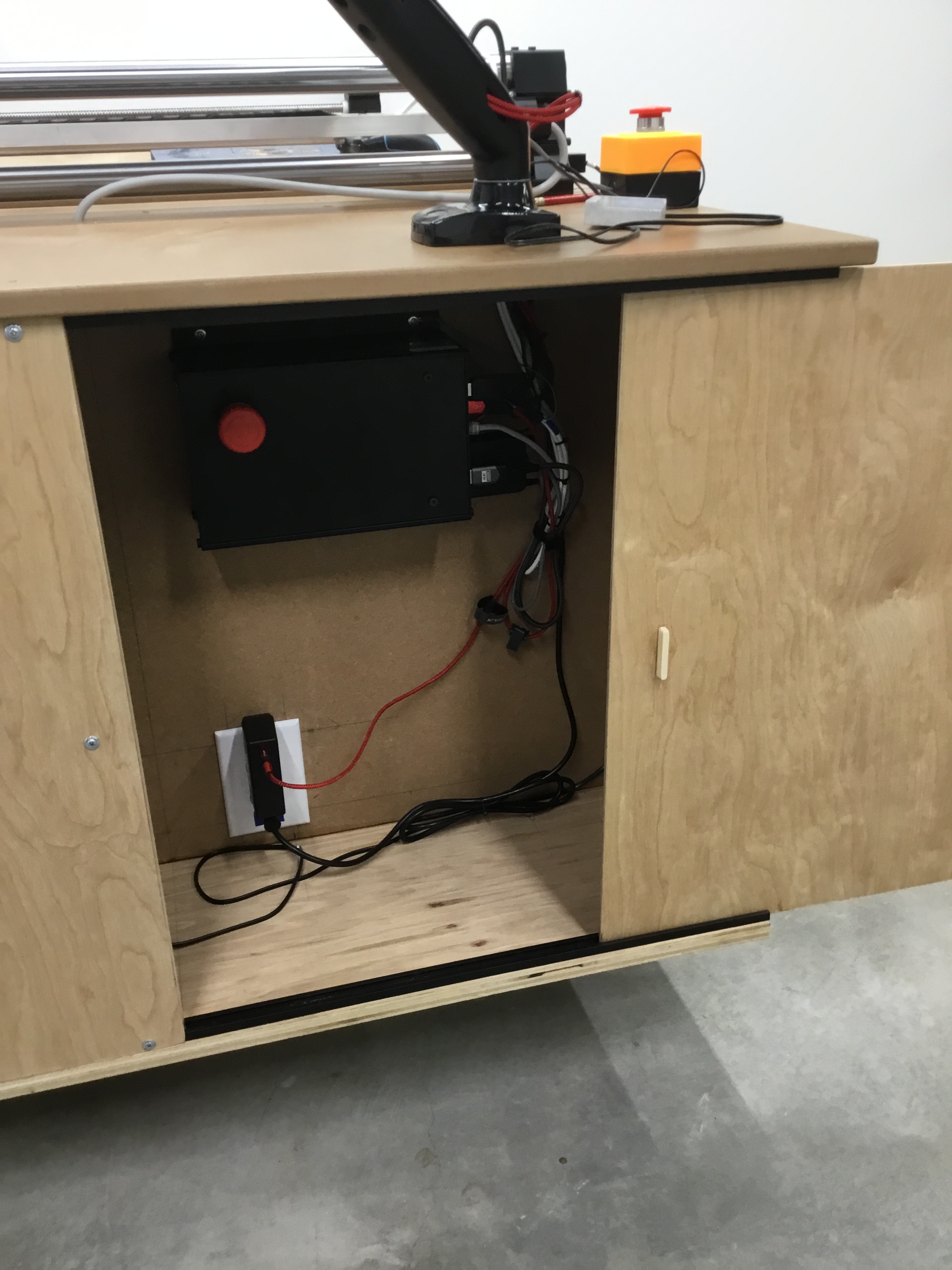
Here are a few pic’s of my setup. Not a spec of dust on my controller. Dust kills electronics!



---
### Author:  [@Atroz](https://forum.onefinitycnc.com/u/Atroz)
#### Post date: [January 17, 2023, 1:20am UTC](https://forum.onefinitycnc.com/t/pwr-communication-failed-at-reg-0-i2c-read-word-failed-errno-121-remote-i-o-error/18177/18 "2023-01-17T01:20:45Z")
Would be real nice if you offered parts instead of requiring the full unit replacement.
You have some upgrade options and you make a product to allow people to make things, would be nice if you also allowed makers to repair their system at this level too. You were part way there with suggestion he try another RPi, but came up short by not offering your individual components for sale. Now he’s looking at a lot of E-waste and expense.
My 2¢.
---
### Author:  [@349iq2345](https://forum.onefinitycnc.com/u/349iq2345)
#### Post date: [January 17, 2023, 7:39pm UTC](https://forum.onefinitycnc.com/t/pwr-communication-failed-at-reg-0-i2c-read-word-failed-errno-121-remote-i-o-error/18177/19 "2023-01-17T19:39:17Z")
Hey Atroz, hey all,
I also think that the AVR mainboard and other components should be given as spare parts, if e.g. the Onefinity controller case and the power supply are not defective.
But a mainboard exchange is nothing for normal consumers. But it should be offered for professionals / repair shops.
However, the AVR mainboard is likely to be the most expensive part of the whole Onefinity controller.
---
### Author:  [@349iq2345](https://forum.onefinitycnc.com/u/349iq2345)
#### Post date: [January 17, 2023, 8:09pm UTC](https://forum.onefinitycnc.com/t/pwr-communication-failed-at-reg-0-i2c-read-word-failed-errno-121-remote-i-o-error/18177/20 "2023-01-17T20:09:56Z")
Hey Jason, hey all,
> [@0bw4n](#):
>
> It just really hurts to have to spend another $500 on a machine that’s only 1 1/2 years old.
Sure that sucks ☹ I was a little surprised that’s so expensive. If you buy the Onefinity Controller together with a Onefinity machine, it is much less (comparison machine without controller/with controller: [$382.50 USD](https://www.onefinitycnc.com/product-page/onefinity-journeyman) (however included in a Sale Price for a machine))
With $500 USD plus tax, for a Onefinity Controller as a spare part, you are already at the price for a new Buildbotics Controller (of which the Onefinity Controller is a hardware fork) [with power supply for $568.00 - $628.00 USD](https://buildbotics.com/product/113/buildbotics-cnc-controller). Unfortunately it is not available at the moment.
Sure it would run with the Onefinity, it is a universal CNC Controller. It evolved a bit further ([[1]](https://forum.buildbotics.com/viewtopic.php?f=13&t=285), [[2]](https://forum.buildbotics.com/viewtopic.php?f=13&t=230)), but some of its restrictions still remain compared to more professional CNC controllers.
But now it has nice new features like programmable G-code macros, remappable I/O ports, 5 V I/O (instead of 3.3 V), G-code is editable in the controller display, more VFDs supported, 0-10 V analog spindle control added (besides PWM and ModBus), better Modbus debugging, WiFi has an external antenna (on the Onefinity, WiFi is enclosed in the case which acts as [faraday cage](https://en.wikipedia.org/wiki/Faraday_cage) ☹) , and it has a [15-pin Auxiliary motor control port](https://buildbotics.com/manual-v1-0-2/#15pinauxilliaryioport) which provides access to the step{X,Y,Z,A}, dir{X,Y,Z,A}, motor enable, and motor fault inputs to the four motor drivers. These lines provide the ability to bypass the internal motor drivers and control external drivers. This allows you to attach [closed-loop stepper drivers like this one](https://www.omc-stepperonline.com/closed-loop-stepper-driver-0-8-0a-24-48vdc-for-nema-17-23-24-stepper-motor-cl57t) and to drive closed-loop stepper motors on the Onefinity classical series (like the Elite Series do).
The Onefinity Controller has these lines internally too, but there is no access to these.
[Next page](https://forum.onefinitycnc.com/t/pwr-communication-failed-at-reg-0-i2c-read-word-failed-errno-121-remote-i-o-error/18177.md?page=2)