Just excited to get it. Not mad, but hurry up  lol
lol
We’re going as fast as we can 
Production update is live!
Here is some more experience, mostly with the software.
Last night I updated the HMI software to 1.4.9 and then made a few very small cuts. Here is what I observed.
The HMI hanged 6 times during a period of 2 hours.
- 1 time it hanged during the spindle warm up procedure. There was no response to any taps so I had to do a hard reset by keeping the power button longer than 5 seconds.
- 3 times it hanged at the moment when I directed a browser on my PC to the ip address of the HMI unit trying to upload a file. My PC is in another room so I heard a metal click from the machine right at the moment when I clicked the browser “refresh” button. The metal click I guess is coming from the motors when a connection between a controller and an HMI unit is lost.
- 2 times it hanged after finishing a short cutting. 1 time there was no response at all. 1 time the HMI unit lost a cursor position so that when I tried to press a button a mouse cursor appeared on the screen 6 inches away. So in both cases I had to hard reset the HMI unit.
The 1.3.10 and 1.4.6 versions behaved about the same.
Each time I had to reboot there were two “standard” issues of lost joypad connection and lost wifi connection. To restore a wifi connection I sometimes need to restart the HMI because it may hang after I click on the “test” button. Altogether I spent about the same time for “jumping” around the HMI as for cutting. It is not exactly very encouraging.
Here one more observation. 1.4.9 introduced a new layout of the spindle warmup screen. The last stage is supposed to be labeled “18000 RPM”. On the screen however it is displayed as “8000 RP” because the size of the frame around the label is too small. This is obviously a very minor problem however it brings questions:
Does the one who made the change looked at how the change looks on the HMI screen? It is very hard to believe that it could be missed. Then how the quality control let such a change go into production? It is all related to how the process is organized. If the organization is the same then the same quality will be in a much more dangerous parts of the software, e.g. incorrectly moved bit can be broken and fly…
I sent an e-mail to redline support and so far got an automated email saying they will answer within 1-2 business days.
@SergeySatskiy Redline has asked us to help investigate this issue for you.
We reproduced the text scaling bug you mentioned on Raspberry Pi systems running in portrait mode. I has been corrected for the next release. We have had reports of several other minor scaling issues from different configurations that have also been corrected. We test about 10-12 different configurations of the software (landscape vs portrait, different operating systems) for each release and aim for consistent scaling in all cases, but every operating system has its quirks. When issues like this arise, we work as quickly as possible to release fixes. You can also reach us directly at support@realtimecnc.com if you run into any issues.
In order to troubleshoot the issue with the HMI issue please let us know the following information about your system (you can respond here or shoot us an email):
- WiFi configuration (wireless band, secure/unsecure, internal WiFi adapter or external)
- Which browser were you using to connect to the remote interface?
- Do you have a webcam attached to the system? If so, which model? Are there any other USB devices attached to the HMI?
- If convenient, can you try a wired Ethernet connection?
- 2.4 gHz, WPA2, external adapter (TP-Link AC600, the one redline doc recommended)
- Windows 11 Pro, Mozilla Firefox 148
- No webcam attached
The closest wired ethernet port is too far from the CNC, so I cannot try.
Incidentally, can I connect to raspberry pi over ssh? There is a chance that something valuable will be in the web server or system logs. As far as I understand you are using unicorn web server. I am not familiar with it but most probably it produces logs. If ssh daemon is up and running then what are the credentials I can use?
In the meantime I noticed that when I locally direct my browser to HMI the resulted traffic produces requests to 2 servers in the internet: www.gstatic.com (for canvaskit.js and canvaskit.wasm) and fonts.gstatic.com (for KFOmCnqEu92Fr1Me5WZLCzYlKw.ttf). This introduces a dependency from a fully functioning internet connection which not always be a case. An alternative of storing these files onboard would make it self consistent and more robust. E.g. how the pages will work if the gstatic.com if offline? What do you think of such an improvement?
This weekend I did not cut anything but made a few changes. In particular I changed configuration of my wifi network. I use linksys velop mesh system with two nodes. It supports 2.4 and 5 gHz networks with the same name. When I initially selected a wifi network on HMI I selected 2.4 gHz one as it was recommended in the documentation. I am not sure how HMI stores the information and it could be that it stores just a name which in my case matches both 2.4 and 5 gHz. There was a chance that after a reboot another band is selected. I would say that this should not bring troubles (authentication is the same) but just in case I reconfigured velop so that 2.4 and 5 gHz networks have different names. Now I am 100% sure that each time HMI picks 2.4 gHz network.
I also changed grounding. Initially I followed redline document which recommended grounding both the HMI and a hose, so I did both. The redline tech support over email asked to remove grounding of the HMI so I did.
I tried to reproduce the issue of hanging HMI at the moment of directing the browser to HMI. On Sat I got it once. On Sun I could not reproduce it but it was just one try. The problem of reproducing is that to get the HMI connected to my wifi I need to reboot it a few times which is both annoying and time consuming. I got the connection on Sunday only once after 2 reboots. The browser connection test passed ok. I decided to make another try, rebooted HMI and did not get a wifi connection after 5 reboots (I tried to press the “Test” button multiple times with various timeouts after start) and that was enough. Maybe I will be lucky later.
My conclusion is that both wifi connection after reboot and hanging after requesting a web page are very sporadic without a reliable way to reproduce.
Thank you for fixing the bug with the layout!
@RTCNC is this the new recommendation? I continue having sporadic HMI freezes but followed the old grounding instructions. Should I remove the HMI grounding wire as noted in this post?
This is a quote from a redline support email I got on Friday:
"Remove the grounding from the HMI to the CNC. We discovered this creates a loop and actually is worse for the static interference. That’s why we removed that document. "
Thanks. I’ll do that today. I was sceptical of the initial recommendation since they’re using grounded power cables already but thought perhaps they had inadvertently isolated some internal HMI components from ground that needed to be grounded. (I once got a laser cutter that had a grounded power plug but inside the box right where the cord plugged into the machine’s receptacle, the ground wire to the receptacle was just swinging free, not connected at all to the incoming power ground  )
)
It would be helpful if when they’re changing previously documented advice that they let folks know generally or at least those that they’ve had Support work with on the problem that had the old doc provided as the solution. A simple query of the Support tickets should be able to identify all the people they’ve specifically provided the bad advice to.
Not sure if this would be a worthwhile addition to our set up, but might help with communication issues…great company USA made and excellent service. They would give you an honest answer if it would be beneficial. They make it with an aluminum and 3d printed enclosure for a little less.
Synapse - Shop JDS Labs Synapse - Shop JDS Labs
Hello all I have had my Gen 2 (Batch 1) “non-Redline HMI” for about a week now and it is beautifully designed and engineered! I have not completely commissioned as of today due to a really frustrating “COM 5 Failed” message that is unfortunately highly repeatable. My approach to troubleshooting has been try 3 different known good USB cables, Try 3 different Win 11 Laptops (all less that 2 years old and “brand names”) and ask onefinity support if this is a known issue. The assorted laptops connected to the Redline controller 1 in 10-20 attempts and every time it did I was able to test the 1.4.9 release and the equipment, I like the bacon strip warm ups for the spindle!
Unfortunately their response went to my spam folder(rookie mistake). The response consisted of a request for a video of the symptom. It is possible that is works when I “mess with or jiggle” the the USB port on the controller but…..
I really want to know if this is being seen on other “non-Red line” Gen 2 systems.
I really do appreciate all the team has done and the development and support rolls are the toughest ones! Best Regards, Steve
Thanks in advance,
HI Steve,
There’s only been one other report and we sent out a new motion controller.
The team is just waiting on your reply with the video so they can see what your seeing!
Hello, I made the rookie mistake of not looking in my spam folder for your reply and thanks for your quick response. Well it turns out that the Win 11 driver does not initialize well with the STM stuff the controller is made of. If I go to Device manager when the Redline controller is connected, find the controller and “uninstall device”. Then go to the top of device manager and “scan for new hardware” while the controller is connected. I now connect consistently. Something I hope makes it to the punch list!
Best Regards, Steve
Awesome! So glad your com port issue is fixed up and it was a simple as deleting it in your windows device manager and reinstalling it!
Is this init/driver issue on anyone’s radar/punch list?
It would be an issue within windows itself.
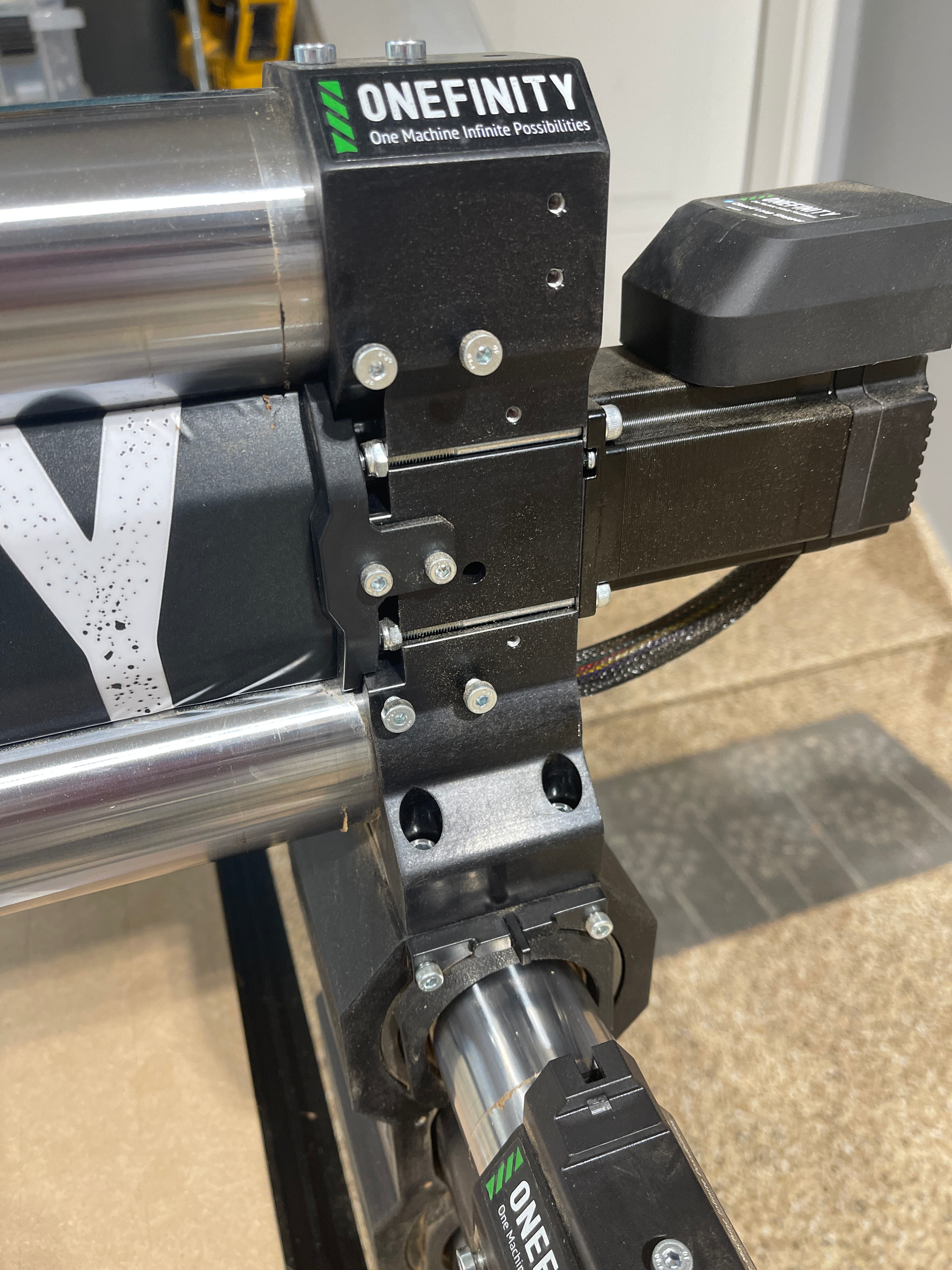
Does the gen 2 not have the z front to back tramming screws on the x axis rails?

I think there are a few improvements that could/should be made on the @OnefinityCNC side based on my Gen 1 Elite:
- Improve the documentation on how to tram the machine in, there is no mention of how to do this in the manuals. There should be a specific section that shows where the tramming adjustments are.
- Add jack screws to adjust the z tram in the left/right plane (inline with the x axis)

Really the AltMill simply connects
Looks like they doubled up the screws and moved to set screws on the back, I might put up a video in the next few days discussing it
Have you tried plugging it into a powered USB hub?