Hello Onefinity. I have one machine at the moment with a batch2 gen2 on order. the redline controller that is a desktop mount does not come with any way to actually mount it to the desktop! It just sits there with only gravity, air, good intentions between it and a fall from the desk top. How about a couple of tabs with a hole in them so we can screw it down to said desktop? might cost pennies but it sure would be nice to have them.
I don’t know if this helps as far as being to mount your HMI, but I ran down in the shop and the back of the Redline HMI is using a standard 100mm VESA mount hole pattern:

This is the same pattern used on the back of MASSO’s HMI (at least on my 2024 vintage model)

I can see where it would be helpful to have something incorporated into the case for ease of use too, but at least they’re using a industry standard and if you want to use a articulating mounting arm like the one pictured above they’re readily available and not terribly expensive. ($35 currently for the one pictured) You do need to be aware of the HMI’s total weight, the arm above is only good from 4.4 to 19 pounds. I haven’t weighed the Redline HMI. I will say it’s far more hefty, in a good way, than the MASSO.
There may be VESA flat mounting solutions that you could bolt on too, or maybe something could be developed by 1f or Redline as something to send along in the kit.
Cheers.
I don’t think it’s the HMI he’s trying to mount. With the Redline kit there are 3 boxes to mount, the HMI, the VFD and a smaller control box. The “desk top mounting" option for the controller is as he noted, nothing but the plain box with nothing available to secure it to a desktop. I’ve had both the VFD and black box controller fall off my table top while I await the release of the longer cables so I can move the boxes into an attached cabinet.
We think he is referring to the redline VFD ‘desktop’ mount. That option is simply a pedistal that the vfd will sit on a shelf. And, correctly, there isn’t any way to attach it to the table. It just sits on the table like any vfd would, holding itself there via gravity.
Ahh, that makes sense, thank you for clarifying that.
Since I have everything mounted below a QCW table I wasn’t thinking of anything beyond the HMI.
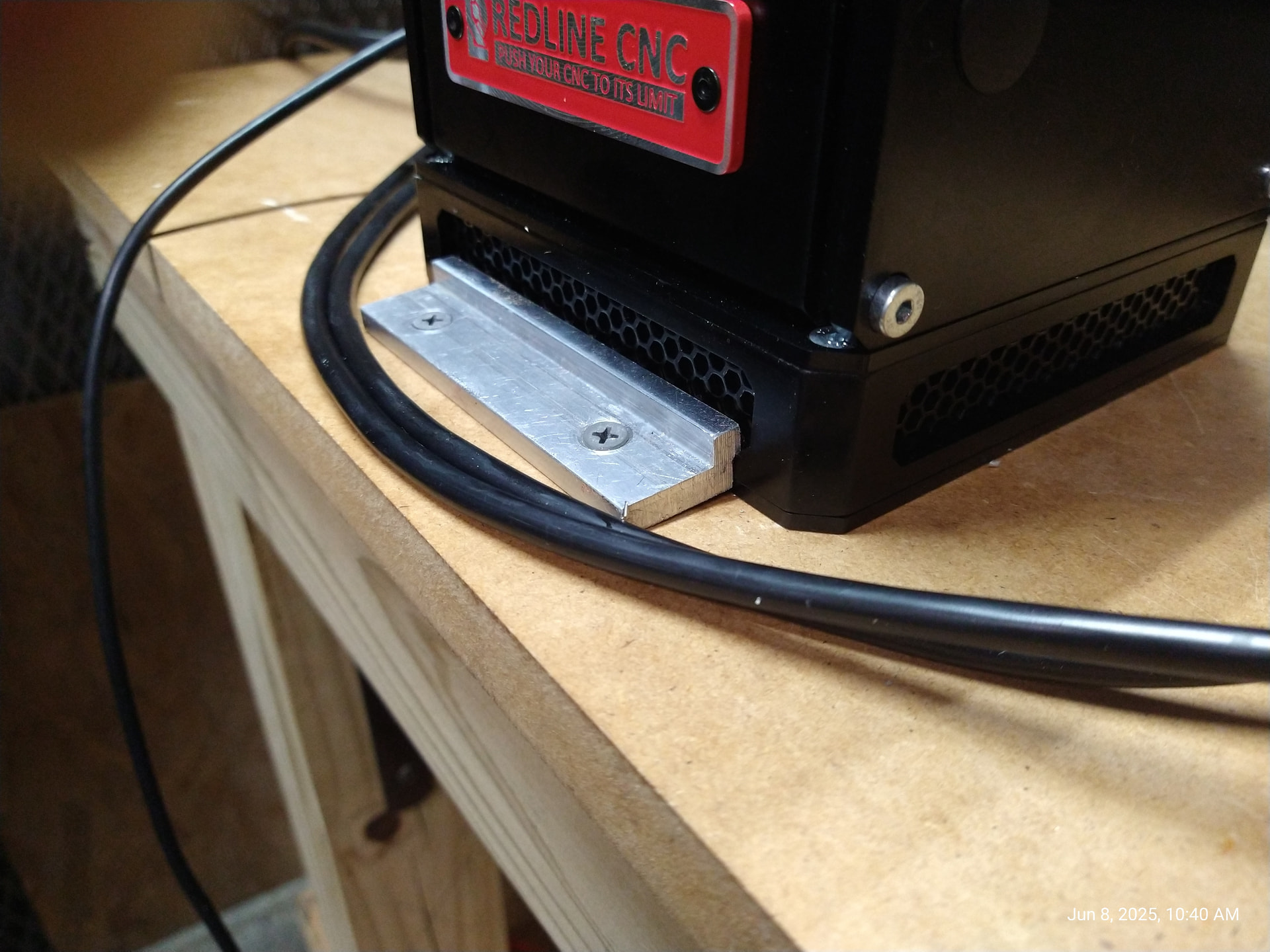
I did come up with a workaround for the controller box. it is this aluminum angle extrusion but not everyone has a mill to make the lips to hold the Desk mount work.
again not something everyone has but hell, Onefinity or Redline could include a couple of these and we would all be grateful. even better would just be a couple of tabs with a hole to secure them down.

I’m a little upset about this myself. I’m setting up my gen 2 right now and realizing this should be described as a desktop VFD but not a desktop “mount” VFD. I thought there would be a way to actually screw it down to the table, you know, actually ‘mount’ it….Guess not… bummer…. had I known I would have opted for the wall mount option.
Hi, could you provide dimensions for the clips you made? I’d like to design a 3d printed version. Thanks!
i will do that for you today. happy easter.
ok here they are.

I made mine from aluminum angle but this is one case where 3d printing would do just fine. I’d like mine in black if you don’t mind lol. they should sell well to our fellow CNC’ers. The hole should be for drywall screws the coarse 1 “ ones work perfect for MDF or plywood.
all i ask is a set for myself.
Thanks Sir! I’ll whip up a prototype type set. I’d be happy to send you a set for a test fit.
Cheers!
I got the set today nicely done. I hope you sell the heck out of them.
robert