Here’s a project a few of you may be interested in for controlling your shop vacs, pumps and other things from your RedLine controller. It basically accepts the low current outputs from the RedLine to drive relays that control your high current devices.
I constructed this for my own use after not being able to find a commercial ready-made product that did what I wanted. I provide a step-by-step how-to, complete with detailed parts list, including sources.
Hope some of you may find it useful.
If you undertake this project, know that you’re on your own. If you kill yourself, I’m not coming to your funereal.
Ok, I read it looked it over and all I can say is, oh hell no! not me not in a million years. thanks for the info though I am sure the electricians will love doing that but me not a chance I can see myself looking down at my cold dead corpse and say Robert you knew you shouldn’t mess with that and now you are dead. lol I’ll just turn the damned Vac on with a switch lol till someone comes up with a much easier contraption that what was just proposed. Way too complicated for my nonelectrical brain. looks like it would cost a pretty penny as well. I am sure it is well done but it is way beyond my limited electrical skills.
After I ordered my Gen 2 I lamented that there is a need to devise something similar to the added control functions I’d made for my X35 and you’ve come up with it for me! Your design and implementation is top drawer……an incredibly neat and tidy package build too.
In short you do not want this, because it will not scale. It would be best to have a control panel on a computer do shop vacs, pumps, cameras, lights and other shop controls. Maybe home assistant?
If I understand what your’e saying, yes this solution may only be capable of controlling 4 outputs, but that is the maximum outputs you can control directly from the Redline controller, so scaling in that context shouldn’t be an issue.
Certainly you could build out a solution using other home automation systems that allow you amazing flexibility and depth, but if you just want to be able to control the outputs directly from a Redline screen and through gcode sent to the controller (or the RTCNC Motion controller software installed on another computer) it’s exactly the right size solution for the problem.
The relays on the board are rated at 30 amps…most of the others are rated at 20 or less. The receptacles are rated at 20 amps as is the 12ga wire. About the relays…pay attention to the coil voltage. The relays I use are 12 volt coils, so that has to match with the power supply that is also 12 volts. You can purchase relays that work with other voltages…just make sure the power supply matches the relay requirements and the relay’s current switching capacity can support the device you intend to connect it to.
The relay boards I purchased are 2 to a package ,but if you’re only going to build out 2 sockets, then you’ll only need one board, one receptacle and a single gang electrical box. You might also be able to use a smaller box for the relay board and power supply. There’s lots of options depending on your requirements. For me, I have three things to control depending on what my project is, that’s why I built it for four devices.
If you built a unit as I described, the cost would be around $150~$170 assuming you had to purchase everything listed in the parts list. Scaling down could reduce that cost significantly. Also, if you’re a handyman type, I don’t know of a handyman alive that doesn’t have a box (or several) of screws and parts left over from other home improvement projects that might “be used someday” that could be applied to this project.
Oh, one other item…yes, it could support 220v. The little power supply will work well with 220v…I use the same one in my home automation to control an electric water heater. The only other thing is you may need different receptacles.
Thanks, Tom. That helps a lot, but I’m still confused about the relay voltage. I had assumed(!) that the relay switch didn’t provide any voltage - it just closed the circuit. I am not familiar with relays (obviously). For example, if I use the io controller that comes with the Redline motion controller - picture attached. Does that operate at 12v? I see the sticker, but I assumed that was the voltage coming in from the adaptor.
What is the reason you move the jumpers on the board to put it in the “low” position?
My ultimate objective is to make a hybrid controller, with a physical switch from the CNC and a remote RF switch when using other equipment, with physical gates controlling the air flow. I need to figure this out the wired part first before I do the remote switch!
You are correct on this, that’s how it works - just like a wall switch in your house. The relay, however, needs power to operate the part of it that closes the switch. That’s why the power source is needed.
The mini-I/O adapter you’ve attached to your post should have come with a small 12 volt power supply…kinda like a phone charger.
If you’re planning on building the project I submitted, you don’t need the mini-I/O adapter. It just plugs into the DB25 connector on the motion controller
I think you’ll need to make the distinction on which way you want to go. 1 - If you use the mini-I/O, you’ll need to use a device similar to what RedLine recommends 2 - If you’re not using the mini-I/O then the project I presented will plug directly into the RedLine DB25 connector and give you independent control of up to 4 devices, or fewer if you scale it down.
Interesting fact…I questioned RedLine from this very board many months ago why they didn’t provide a voltage source on the DB25 connector like the BB CNC controller did. They gave me a very elegant reason why and I was ok with that…it made sense and their documentation reflects what they told me. Many months have passed between the time I ordered my upgrade kit and when it was received. After going through all the components, I came across this thing called a “Mini-I/O” that had what I was looking for. However in the months that I was waiting for my kit to arrive, I developed the project that is presented here. It was built and ready to go by the time my upgrade kit arrived. To me, the Mini-I/O kinda looks like an afterthought that wasn’t factored into the original design. RedLine never made referance to it in their response to me way back then.
would someone anyone please answer a simple freaking question I have been asking over and over again what size and type of wire I need to connect the in /out mini to this
please tell me the wire size that’s all I am asking I don’t want another picture of this or anything else just the wire size. I have been asking for a week now and all I get it the same links and copies of this blurb over and over and guess what …It doesn’t say.
It’s low voltage, low current so 24ga wire or heavier will work for reasonable distances 10~20 ft between mini-i/o and power strip or less.
Commonly found lamp cord (zip cord) will get the job done. You just have to make sure you get the polarity correct. Lamp cord will generally have one wire that’s ribbed and the other is not or a stripe on one wire - that’s how you can identify which is which. Put the wire that’s marked on the + on both the mini and power strip, and the other wire on -.
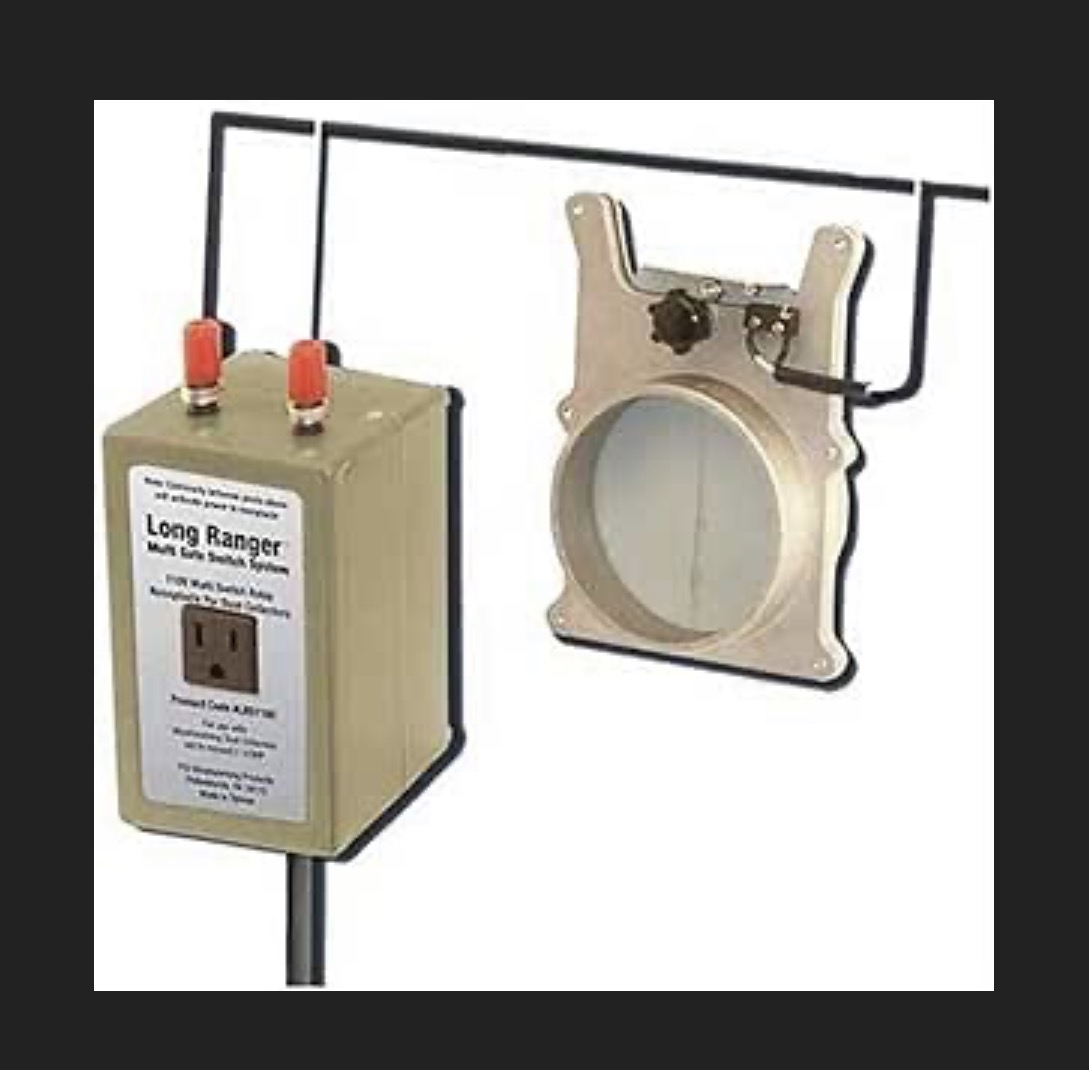
I currently have an old remote-control system from PSI Woodworking called the Long Ranger. It was designed for wired blast gates, which I have used in my shop for almost 15 years. It turned out I could connect it to Output 2 on the new IO port on the Redline controller, and I can toggle it with the M8 and M9 commands in my post-processor. I just ran two wires to the IO port and the two connections on the Long Ranger. Everything works great, but I want to upgrade to a 220v dust collector now PSI only sells a wireless version of the system, the Long Ranger III. I’d like to find a solution that supports my wired blast gates and the CNC controller. I guess PSI didn’t have much demand for a wired switch once they had a wireless version. This is the old unit I have: