I continue to wonder why Batch 1 hardware orders were delayed until the Windows code was released. We all could have stated using our equipment today. Can you explain the “why” behind this approach?
The controller hardware maintains the current units so it will not change unless the hardware is connected. (The software sets the current units when it first connects to the controller hardware).
The joystick issue could be a few different things. Some wireless gamepads have to be turned on for the software to detect them. If you still have issues, let me know which gamepad/joystick you are using and we can investigate.
The software will run in portrait mode if the screen the application is started on has a portrait resolution (height > width). You can also force the application to start on a particular screen by adding the screen number as a command line argument.
We are releasing a hotfix version (1.4.7) to clean up some of the scaling issues on different machines along with some other bug fixes. This should address some of the font size issues. More refinement will continue in the next release.
The spindle mode is also synced with the hardware so you will need it connected to change the value.
We had another user suggest displaying the values in each default. It is on our development list for a future update.
The screen jog and pendant are super cool! Probably my favorite way now, maybe more than the gamepad! I think the acceleration on the pendant could be softer for the small steps like 0.05” (its a bit jerky and makes the whole table shake) but overall works really well!
I got the font size change issue too, sounds like you are aware of it, see photo.
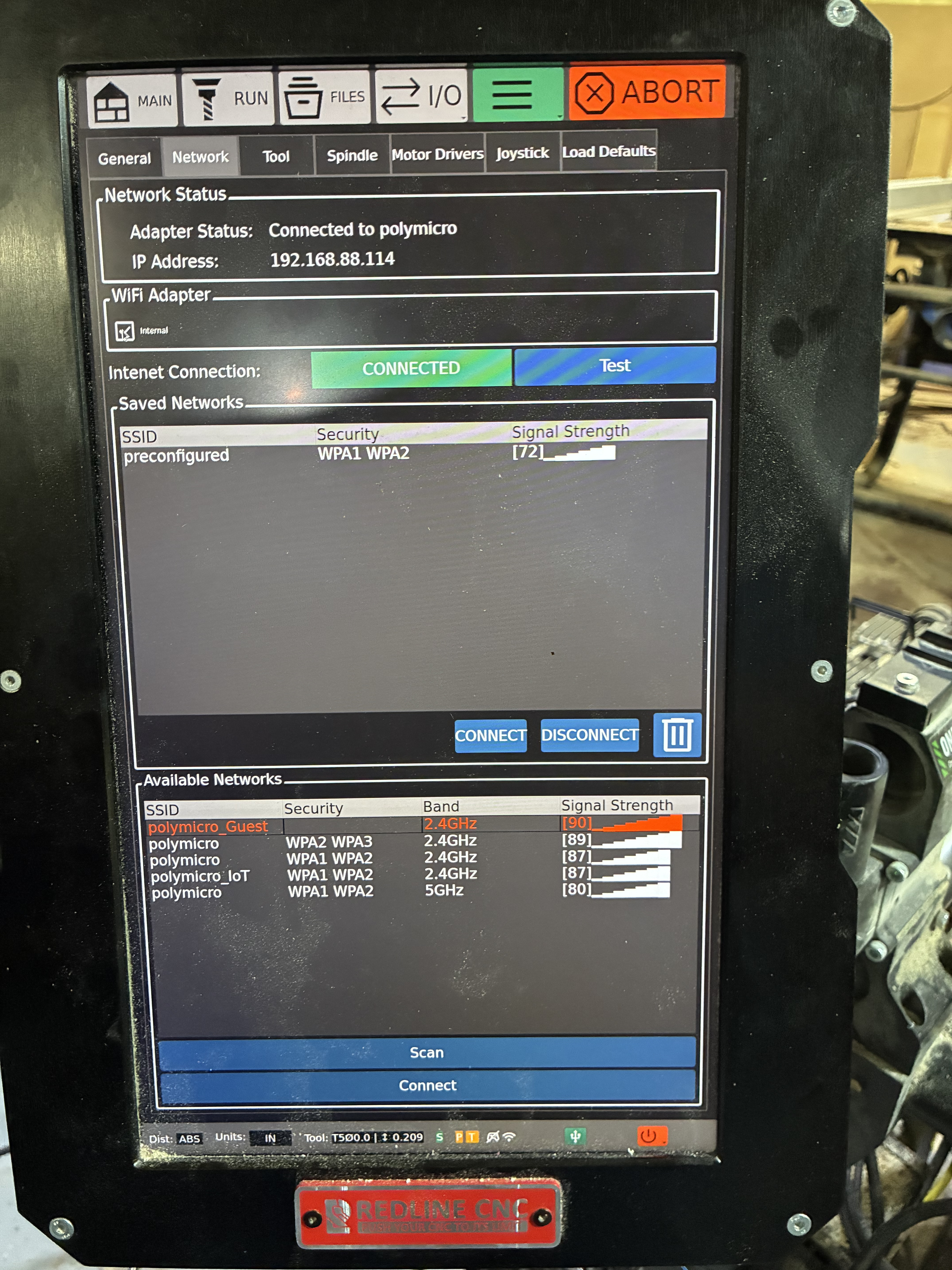
I have a wireless issue too. My SSID has more than one AP. Normally computers show only a single SSID but yours shows one per AP. When I pick the strongest signal one, that doesn’t seem to be the one it tries to use to connect and it fails. I created a special SSID just for the RTC controller and pinned it to the AP radio closest to my shop. That works. When you work on the networking features please be aware of this issue when there are multiple access points for a SSID.
I could write a small book on all the problems I see:
First off, the UI has become quite frustrating. The text is so small that I need a magnifying glass to read it (I’m getting older and my eyes aren’t what they used to be). The person in charge of UI should check the basic guidelines for font selection, especially when it comes to color and size, and how the proportions work in UI layouts. The color choices, like using white text on light gray, are a bit off, and the red on dark gray in the run view doesn’t have enough contrast.
As someone who used to manage software and firmware, I’ve noticed that programmers usually shouldn’t be making these decisions. However, we had a whole Human Interface department at Apple doing this work, and Apple was the first to really invent HI.
Standard UI layouts typically follow a “Type Scale” to create visual hierarchy.
Body Text: The standard for readability is 16px (1rem). Anything smaller than 12px is generally considered inaccessible for primary content.
Secondary/Caption Text: Usually 12px to 14px. Used for labels, timestamps, or helper text.
Headings:
H1 (Page Title): 32px - 48px
H2 (Section Title): 24px - 32px
H3 (Subsection): 18px - 24px
Line Height (Leading): For body text, a line height of 1.5x the font size (e.g., 24px line height for 16px text) is the “golden rule” for comfortable reading.
2. Color and Contrast Guidelines (WCAG 2.1)
Color in UI isn’t just about aesthetics; it’s about ensuring users can actually see the content. The WCAG provides strict ratios for contrast:
Standard Text (AA Level): Requires a contrast ratio of at least 4.5:1 against the background.
Large Text (18pt+ or 14pt bold): Requires a ratio of at least 3:1.
UI Components (Borders, Icons): Should maintain a 3:1 ratio to be distinguishable.
Color as Information: Never use color as the only way to convey meaning (e.g., don’t just make an error message red; include an “Error” icon or text label for colorblind users).
3. UI Element Color Logic
Most professional UIs use a “60-30-10” rule or a structured palette:
Primary Color (10%): Used for “Call to Action” (CTA) elements like Submit buttons or active states.
Secondary/Neutral Colors (60-90%): Grays, whites, or off-blacks used for backgrounds, borders, and containers to reduce eye strain.
Semantic Colors:
Success: Green (e.g., #28A745)
Warning: Yellow/Orange (e.g., #FFC107)
Error: Red (e.g., #DC3545)
Info: Blue (e.g., #17A2B8)
4. Recommended Reference Documentation
If you are building or refining a UI, these are the “bibles” of the industry:
Redline Gen1 Elite Foreman (summer sale) and upgraded firmware.
Project is an inlay cutting board. Clearing pass went fine. Returned to XY zero and changed but for the detail vcarving. Used the probe for setting X zero. Unnoticed by me, the machine also chose a new position a couple hundred mm to the right as the new X zero. Of course when I executed the detail carve it started off badly and carved through the side of the board before I hit the abort button. Used the MDI to return to X0Y0 and saw the problem. Board ruined. Reset the X0 to the correct machine coordinate and reran the program from the beginning to make sure my file was going to work when I try the board again. Fourteen minutes of runtime and except for the rogue carve no issues.
Next problem arose when I jogged (using the controller buttons, not the joypad) to the left front. Y1 stuttered the entire way. Ran several jogging tests backwards worked fine, no stuttering. Forwards stuttered regardless of starting position or jogging speed. Homed the machine and tested jogging again with the same results. Rebooted the HMI (did not seem to really power down despite the screen message that it was). Turned off the VFD & the HMI. Restarted the VFD then the rocker switch on the HMI and then the HMI pushbutton. Homed machine and retried the jogging tests. Back to normal.
Tomorrow I will load up a new board and try my project again. I may start a wall of failure for all the projects I’ve had to trash because of machine issues - still cannot do a real carve with my dust collector attached despite all of the grounding so I do that by chasing the spindle with a vacuum hose. Now I need to add a check for correct X&Y zero between bit changes (I already take a photo of the machine coordinates after zeroing to start a project so I can restart whenever the HMI decides to go unresponsive). No way I can use the toolsetter with the machine changing axis zeroes on bit changes. I hadn’t reset the configuration after the firmware update flushed the previous settings.
Also a problem with using the web interface to upload projects to the controller. If I drag & drop a bunch of files from Explorer to the web interface upload file screen, they appear to load but as before most are not successful and are truncated without warning. Your enhanced error checking isn’t working. Single file drag & drop works. Clicking the Upload button only sporadically works - most often it opens the file picker window but with everything blanked out and then the web page goes unresponsive.
I would recommend folks not upgrade the firmware until after you’ve had a chance to shake it out some more & get the hot fix ready.
@dsunds Thanks for pointing out the scaling issue on the pendant axis buttons. They definitely shouldn’t be set to a font size where they are visible from orbit! This has been fixed in the next release.
In terms of the networking on the Redline version, our software gathers the network info from the operating system. It seems to be reporting some 2.4GHz and 5GHz separately even if they are the same SSID. Our team will investigate.
@tgunr In this release we migrated most of the UI elements to dynamic, responsive elements which give us more flexibility in cross-platform deployment. As you pointed out, there are some elements (buttons) that were left in their original format and they defaulted back to a smaller font size. Our next release fixes a bunch of these UI elements. If you see any others let us know and we will address them ASAP.
The UI design information your provided is quite interesting. One of the challenges in our cross-platform deployment was handling dynamic and responsive UI layout across multiple operating systems. Particularly, things get complicated when dealing with a wide range of screen resolutions and scaling. In our test cases, we had machines with incredibly high screen resolutions that were set to very high scaling which produced relatively low effective resolutions. We have migrated a large portion of our UI asset management (icons, etc) from raster to vector elements. We are also working through balancing and matching font sizes across all the controls and UI elements.
Sorry for the info dump but based on your background, I thought you might find it interesting.
@JimHatch We would like to duplicate your workflow so we can attempt to reproduce the issues you are seeing. Shoot us an email at support@realtimecnc.com so we can gather the necessary info. If you are willing to share your toolpaths please include them in the email. We can run them here, in-house, with the same workflow you used.
There are also a few points we want to clarify for our testing:
You mentioned using the probe for setting the X zero. Did you perform a full XYZ probe or use the probe block to gauge the edge of the workpiece and then modify the WCS offsets?
You mentioned jogging with the controller buttons. Were these the touchscreen jogging controls? If so, which jogging mode, distance, speed, etc.
The machine settings (including probe dimensions) should be retained between software updates unless you do a full SD re-image. We did a few tests by updating and rolling back firmware on a Redline system and the probe dimensions were retained. If you are still having issues with settings being lost please let us know.
The tool setter position is referenced in absolute machine coordinates so the WCS offsets should have no effect.
The web interface does not support multi-file drag-to-upload. I just did a test and most browsers should reject a multi-upload attempt but some do not. For the next release, we have completely disabled multi-file drop and we will look at adding support in a future release.
I do indeed fi9nd it interesting and quite understand the challenge you face in addressing the plethora of devices out there.
Going to vector graphics will help out a lot. I have not peeked under the hood yet to see what you’re using for cross platform development and testing.
Be advised, if I can help you out as a tester I can do so. I presume you’re using some kind of software like Jira or Redline or one of the many others to do issue tracking. I also can understand reluctance to provide that interface to the public as it can become quite a quagmire as we discovered at Apple using our in house developed Radar system for such use, When I left Apple there were over 2 million issues in the database, I wonder what it Is today? LOL
Anyway, what we would do is provide the interface to trusted users who knew how to construct a useful report for the engineers to address. You might consider doing something similar.
I have been programming firmware since the old 8008 days back in the 70’s when you had to actually flip switches to write code into registers. Thank god we have moved on from programming with octal and hex code by hand.
I’d be willing to be a tester too… well, once I receive my batch 2 machine that is. I’ve been a web application designer/developer since the late 90’s. I’ve seen my share of responsive UI issues and have become the go-to team member for fixing such issue. Happy to help if I can.
You mentioned using the probe for setting the X zero. Did you perform a full XYZ probe or use the probe block to gauge the edge of the workpiece and then modify the WCS offsets?
My project uses the center as the project zero. When changing bits I used the probe for Z only. As I noted, the Y zero was retained and the Z value was appropriately updated. It was just the X zero that was shifted right.
You mentioned jogging with the controller buttons. Were these the touchscreen jogging controls? If so, which jogging mode, distance, speed, etc.
Yes jogging with the screen buttons from the Main screen, Jog tab. Are there other jogging buttons available in the software (other than the ones in the Probe function which I’ve not considered using for general jogging purposes)? Once I noticed the Y stuttering I tested multiple speeds from the stack of speed buttons on the Main|Jog screen (trying to determine if it was caused by the jogging speed) and various distances using all of the forward direction jogging arrows and then resetting the machine home using the screen button. They all had the Y stuttering so I did the cold restart to clear all of the various component memories which appeared to resolve it.
The machine settings (including probe dimensions) should be retained between software updates unless you do a full SD re-image. We did a few tests by updating and rolling back firmware on a Redline system and the probe dimensions were retained. If you are still having issues with settings being lost please let us know.
I didn’t mention the probe settings (I haven’t messed with those), what I lost was the setup for the toolsetter. I used the OTA update so no SD reimaging on my part. As part of trying to fix the Y axis stuttering I did the software reset to defaults (Gen 1 Foreman 48x48) so I expect the toolsetter setup will be needed again but that’s to be expected with a reset, not with a firmware update.
The tool setter position is referenced in absolute machine coordinates so the WCS offsets should have no effect.
Understood. It’s not the coordinate system that concerned me, it was the toolsetter setup I did when I installed the toolsetter (location & offset) that were lost with the update. That’s why I had to do a manual Z zero on my project yesterday on my tool change rather than use a multi-tool G-code program.
The web interface does not support multi-file drag-to-upload. I just did a test and most browsers should reject a multi-upload attempt but some do not. For the next release, we have completely disabled multi-file drop and we will look at adding support in a future release.
A warning about not supporting the multi-file drag & drop would be good because it appeared to support it I was using the latest Chrome version. Disabling the multi-file drop is a good fix for now.
@JimHatch Please update and let me know if you are still having issues with probing and jogging. The multi-drop should also behave better with this update. If you multi-drop, only the first file will be uploaded. Also, if you try to upload a file while another upload is in process, it will reject the second one and pop up a message. In terms of the tool setter position, we tested several Redline system with the OTA update and they retained their tool position even after loading defaults. Let me know if your system behaves differently.
@tgunr This update has a bunch of GUI scaling improvements. Let us know if you see anything else that could be improved.
@sbetts Thanks for the offer to do some beta testing. There has been interest from some other users. We will look at adding a mechanism for sharing beta versions ahead of full releases.
Most of these bugs are now fixed in realtime firmware update 1.4.9.
We’re going to close this thread for now.
If you experience any bugs in 1.4.9 or later, please send an email to support@realtimecnc.com for the quickest resolution, or, create a new thread in the Realtime controller bug & Software Request thread.
We’re trying to consolidate multiple threads of issues, bugs, and requests into what has been resolved and what is still open.



 I was using the latest Chrome version. Disabling the multi-file drop is a good fix for now.