Elite Upgrade Problems - help, please

Hello all.

I am hampered by the Elite Upgrade to my X-50 Woodworker,. It is of such magnitude that I can’t even remotely Fathom the possible reasons for what’s going on. I have had my Upgrade kit for a few months, now, but was just recently able to get around to tackling the upgrade procedure.

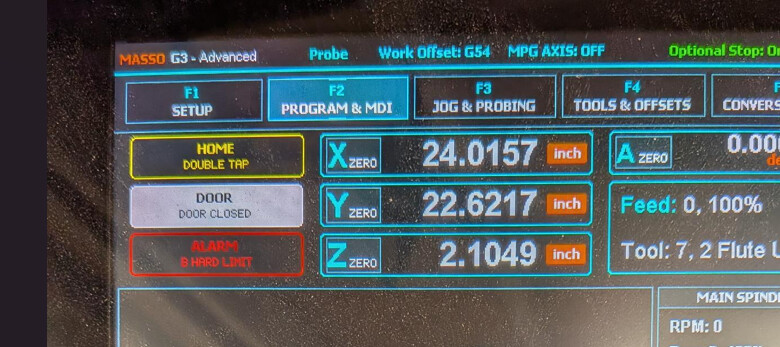
The first problem encountered had to do with the B1 Rail’s ball screw. The only installation reference info, that I could find, was an upgrade video by Onefinity’s Stone. In pulling the X-rail carriage forward, there was no more than the expected resistance. However, after installing the new motors, and other components, I was ready to move that carriage back to the rear. That, is when the B1 rail wouldn’t move at all. I then went to the Y rail, to see if the ball screw could be rotated by hand. I could do so with no issue. Then, turning to the B rail, I tried the same – and that ball screw wouldn’t budge. I contacted Onefinity, and was advised to back off that side’s coupler screw, a bit. But, because I can’t really rotate that ball screw, I can’t get to that coupler’s screw. Initially, there was the thought that I might have (kinda) torqued that particular screw in. But, I don’t think that I applied any more pressure to this side’s coupler screw, than I did to the Y side. I am so discombobulated that I don’t know what to do. Onefinity DID do diligence in their efforts rendered to help me, and even had someone (Mitz) make a personal call to me – and we stayed on the phone for about an hour or so. At a point, he asked me to power the system on. The Masso came to life – but with some issues. No rail movements could be made, at all. Not only that but, of those three rectangular boxes – at upper left of the Masso screen, the red and yellow boxes are constantly flashing. The middle one isn’t flashing, but states that the door is ‘Closed’. Depressing the emergency stop button in, and pulling it back out creates no difference. Powering down the Masso, and restarting it, also makes no difference in the former mentioned behavior.

Mitz, thought that I may not have properly secured the wire connectors into their ports, but I did the best I could. I say it like that, because of noticing how a couple of them seem to push back, a little, despite my hand pressure at pushing them in.

Again, Onefinity Support (as well as Mitz) DID do their best to help me. But I’m reaching out to ya’ll, here, in the event that someone has personally experienced what I’m having to deal with – and hope that you might be able to share, with me, how you were able to conquer what I am faced with.

My advanced thanks to any, and all.

Nathan
Where are you? Perhaps there’s someone nearby who can come over and help in person.

I didn’t think of that, and I thank you for the suggestion.

I am located in Amherst NY 14226.

1 Like

If you take the motor off the B1 rail does the ball screw move freely again?

Also I would suggest posting a picture of the Masso screen to help identify what the 3 boxes are you are talking about. I can guess they are probably the Home and EStop notices that always come up when you first start your machine. If thats so then the bottom of the three will only stop once the ESTOP has been pressed and released and the top will stop once you double press it to home the machine. If pressing and releasing the ESTOP does not stop the bottom of the three from flashing then you definitely have something wrong.

1 Like

That sounds incredibly frustrating, and you’ve definitely done the right things so far. The locked B-rail ball screw plus the Masso warnings makes it seem like there may be a mechanical bind and a wiring connection issue happening at the same time. A few of us have run into similar problems when a coupler wasn’t fully seated or a connector looked clicked in but wasn’t quite latched. If one of the plugs is backing out even a little, it can cause the Masso faults you’re seeing. You might try unplugging and firmly reseating each connector one at a time, especially on the B-side motor and limit switch. Hopefully someone who’s had the exact same symptoms can chime in, but hang in there, issues like this are usually something small that just needs a second look.

Hey Calvin, I cannot gain access to the locking nuts, on the coupler, by which to allow for motor removal. And that’s due to the seized ball nut. Also, I see no way to post a picture of my Masso’s screen.

  1. Yellow box (HOME - Double Tap) constantly flashing - even when double tapping is initiated.
  2. White box (DOOR - Door Closed) Steady.
  3. Red Box (ALARM - B Hard Limit) constantly flashing, even with activations of the Estop button being pushed in/pulled back out.

Home wont stop flashing till you home the machine which requires everything to be up and working first.

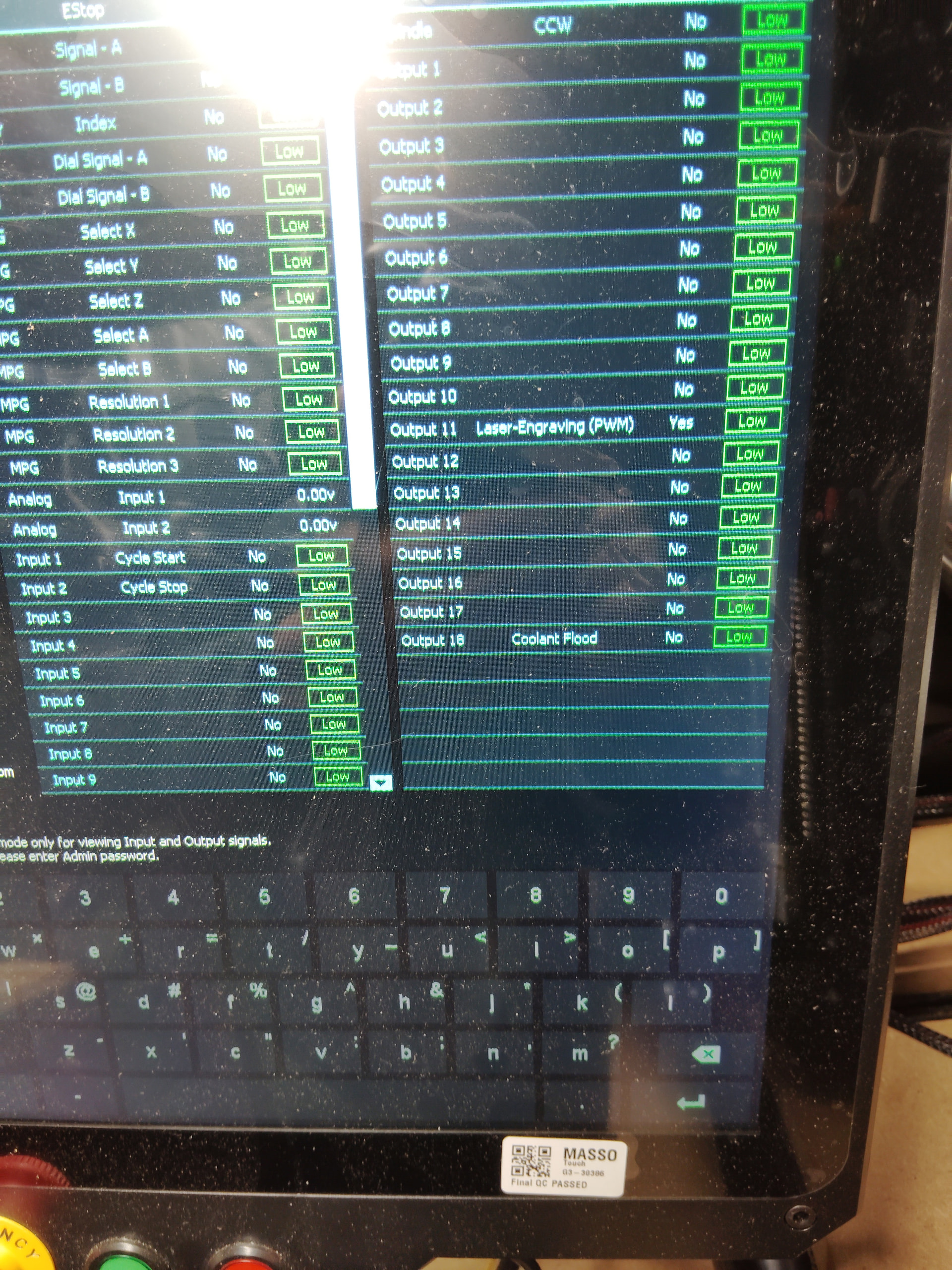
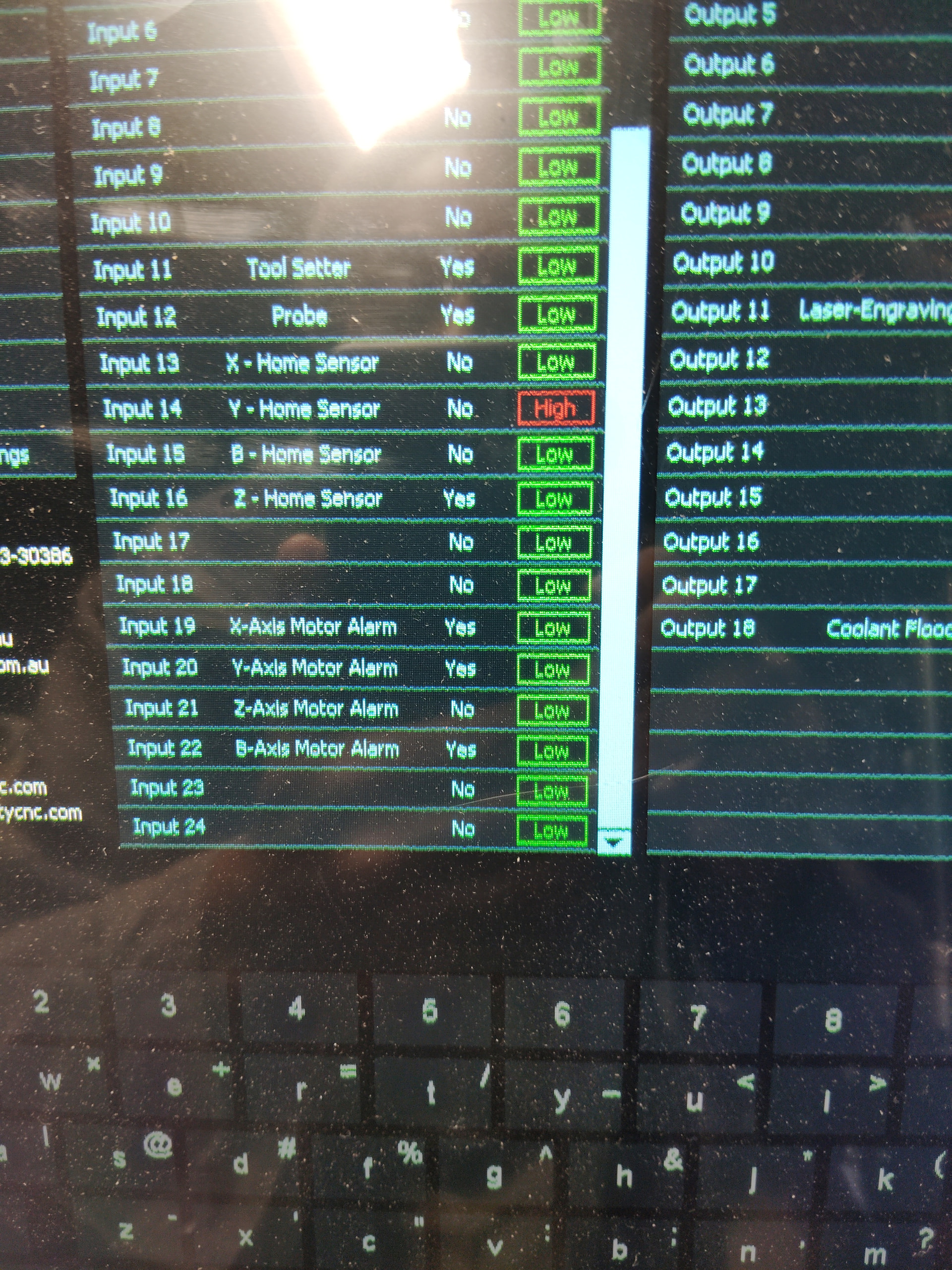
The third button showing B hard limit is suggesting that your B axis homing sensor is either tripped or not plugged in. I can recreate that by either unplugging my B homing sensor or tripping it. Attached are photos of the Masso screen. The other possibility is that you have the input inverted on the B sensor possibly.

Of course the sensor isnt going to stop it from spinning freely with the machine off, but its something to start with. I am not sure if you went over this with your support emails and calls.

Remember these photos are with my B homing sensor unplugged trying to recreate your issue. Normally when the homing sensor is plugged in the F1 screen shows “LOW” unless tripped(caused by breaking the sensor beam).

1 Like

Jeanzanders, I thank you - also, for your contribution here. It means much.

I have tried reseating all connectors, but those actions have been unremarkable. What I HAVE found is that a number of them have presented a wiggling (especially the male plugs going into their female mates, at the underside of the Masso Controller). Each attempt at firmly pushing them in only results in an immediate push back. Not much but, maybe, enough to not allow for proper connection. Another thing I noticed is that some of those connectors had a little tab, on its end, which was for securing the plug into (again) the female part - and some did not. I don’t know why that was, but it is as I have noted.

I am also quite concerned regarding the two-piece housing for the Z1, and X1 cord ends. These, had to be encapsulated into said housing, and bolted into the front side of the Y rail block. I watched stone, in his video, very easily set his cable wires in such, and with not even the slightest difficulty. Now, I don’t know if the tolerance issues were off, on MY gear, bit I (and with no exaggeration) fiddled around with that setup for a whole evening. I had to force a wire in THIS way, and another in THAT way, to fit the grooves which had been created for the cord ends - all in hopes that they would finally seat right. It took a great deal of bearing down on that, and I wonder if just maybe I wasn’t able to get things seated as they should be. Onefinity Support DID try helping me, and also warned about being too ‘bullish’ about it. But, there was no way, at all, that I could get those things right without being as aggresive as I had to be. Again, I believe that it had to be about an off-tolerance issue. I am not really pushing blame. But I do know that nothing, and no one is perfect. I am just hoping that this matter can indeed be squared away, and that I can finally get down to business before much longer.

1 Like

Hey Calvin, If I’m in total understanding of what you’re asking, I won’t be able to remove that motor due to not being able to access the locking nuts

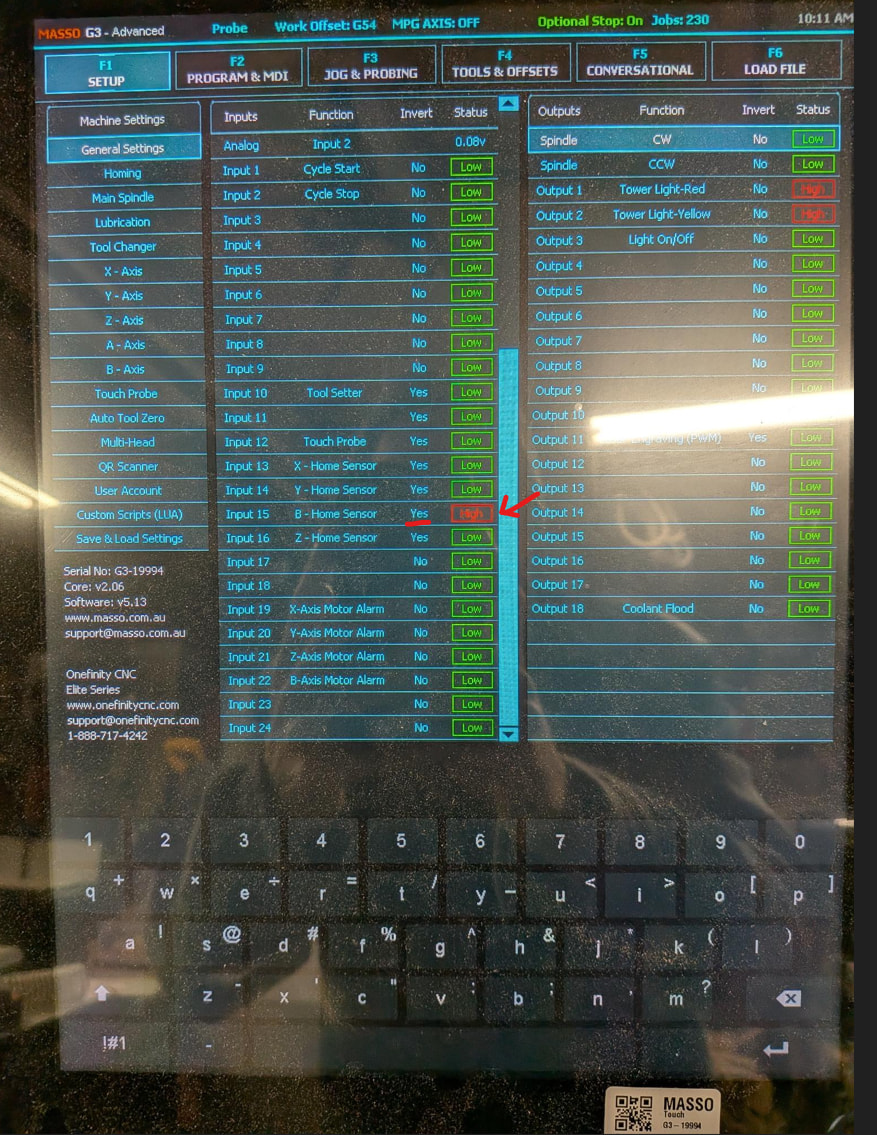
Dont worry about the other connections yet. Right now your machine is telling you everything wrong is with the B rail. I would look in the F1 screen and see if you are seeing it show “LOW” or “HIGH” and if it says inverted yes or no. If you see it say HIGH then I would go to that sensor and see if looking down over it you see the red light to indicate the sensor is actually on. If you have no light then your problem is the sensor is not getting power or possibly a defective sensor. You can see if its the sensor itself by swapping it with the Y rail sensor as they are identical mechanically. If you swap it and still dont see a faint red light in the sensor itself I would think that somewhere along the lines you have that cable unplugged and I would focus on tracking it down and see what you can find. The power cable on the sensor is keyed (with a clip too) so it can only be plugged in one way so if you have pushed past that and plugged it in backwards that may have damaged the sensor itself.

I am not an expert, just another dude trying to help.

1 Like

Thanks again, Calvin. Yes, it is also possible that my issue could be user error related. I am definitely getting into my shop in just a bit, to check out what you have offered. Also, how did you go about attaching those pictures?

You can either click the upload button or you just CTRL+C and CTRL+V to copy paste into the message box.

I didn’t see an ‘Upload’ button. But figured it had to be there, somewhere :slightly_smiling_face: . Thanks.

Hey Calvin, I’m backatcha - AGAIN :slightly_smiling_face:.

I apologize for not having gotten back in touch with you, before now. But I have been fighting with my CNC issues, without seeing ANY signs of betterment, as yet. Attached, is a picture of the one Masso Screen. I wonder if what is shown, within it, might reveal something about what the problem is.

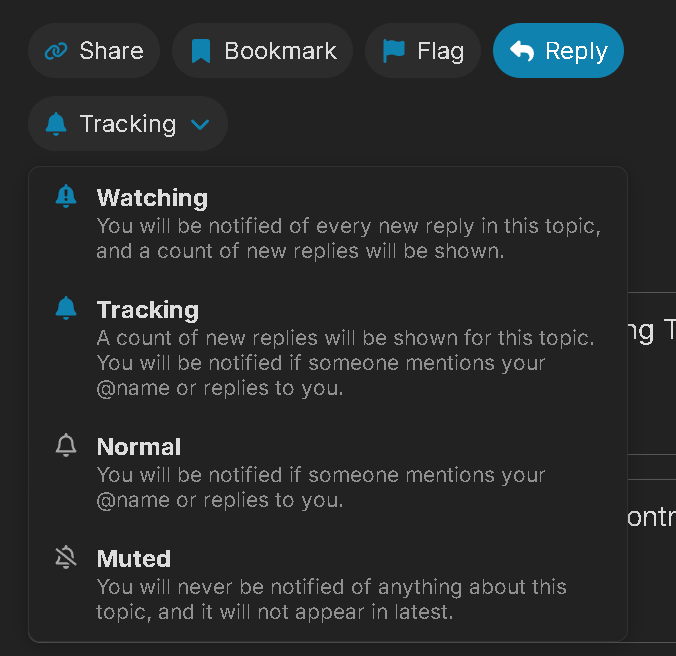
Also, does this forum allow for replies to automatically give email notifications? I’ve searched for that, but didn’t find it.

Now you that can post pictures, can you send some more like position of each axis and coupler?

You need to scroll down on that panel on the left of this image. The sensor inputs are not visible as they are inputs 13-16.

1 Like

A couple thoughts:

  1. Is the carriage sitting at the limit switches?
  2. Is the lead screw jammed both powered and turned off?

I had a issue once recently where my elite failed to home and gave me a similar set up, what I did was turn the power off then manually move the axis’s away from the limit switches then it was able to home without issue.

1 Like

Head to your profile and adjust the second setting under email:

you can also go to the bottom of the thread and change your tracking setting:

1 Like