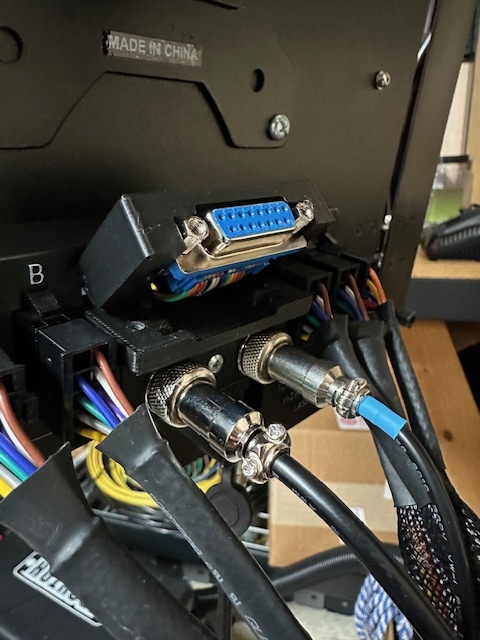
The Masso MPG pendant is great. Way better having tactile feedback when you’re doing machine positioning. What’s not great is that the DB15 Port into the Masso controller leaves no room to plug in directly.
Somewhere here or another forum I saw that you can pick up these cheap DB15 ribbon cables that can make the 90 degree bend easily.
So I went with that idea but didn’t like having the ribbon dangle out the back of the enclosure. so I designed this port that holds the female end at the back. Much tidier and easier to plug in / remove.
The bottom slot is occupied by the RapidChange ATC / Auto dustboot wiring, so top slot it is.
I’m running a MASSO on small mill and always found their solution of just removing the hard case from the end of the plug and letting the wiring harness just flex to make up for the lack of space, wanting.
I’ll probably go revisit that and steal your idea.
Lcom makes a right angle adapter for this purpose. itis a thread on this forum. very neat look and functions perfectly. i will look it up and post the link. in a few minutes
I saw a bunch of the solutions previously and they did solve the right angle issue with the MPG clearance but still required you to open the enclosure to plug in, or had a loose connector go through the back. I prefer the clean look and don’t have to open my enclosure to install the pendant. Easy to add a cable extension if I want to. I have my Masso on a swinging monitor arm so keeping it tidy helps with the articulation.
I have an enclosure so also have the Masso on an articulating monitor arm. Like you, I have the cables wrapped to keep them tidy. The pendant is mounted on the right side of the Masso.
Here’s the STL if you’re interested. It’s a 2 piece design, uses 2 M4-16 bolts. Bolts will cut threads into the bottom piece when installing.
The bottom piece goes first and the top cover swings into place. One thing to note is you need to bond the screw terminals on the Masso to the MPG port so you’ll need an extra wire that feeds along the ribbon cable (Circled in yellow). There’s clearance in the top piece to use a 4-40 nut to tie the wire to the standoffs. I just used an extra standoff from the ribbon cable kit I bought.
I thought my cables were faulty since my MPG didn’t work until i realized this.
Use regular supports. They remove better than tree.
Here is the STL file I created for the pendant holder. There are several others (probably better) available online, and also uploaded by others in this forum.
Instead of removing the original monitor mounting arm, I created a sleeve for it to hold extra collet nuts/collets and the bits used on the current project - STL also attached. I didn’t think of it at the time, but I should have added magnets on the back to hold the wrenches.


 The pendant is mounted on the right side of the Masso.